For hobby and show breeders
Puppy go home packets that look like a professional made them

Enter your litter once — sire, dam, pedigree, weights, vaccinations, microchips, feeding plan — and every puppy gets its own typeset packet of 10 sections, with the growth chart plotted from the weights you logged. One PDF per puppy, one zip for the litter, ready to print or email on go-home day.
Or skip most of the typing: photograph the vaccination card, open your spreadsheet of weigh-ins, and check every line before it is kept. Either way you are looking at a real packet page with your own dog’s name on it a couple of minutes from now.
- Free to build and preview
- No account, no card
- Works on a tablet at the whelping box
- US Letter or A4
Build and preview the whole thing with your own dogs in it for nothing. $29 a litter takes the SAMPLE watermark off the exports and reads the rest of that litter’s paperwork; $99 a year covers a kennel. See what paying changes.
What comes out
A 10-section packet for every puppy, built from one set of details
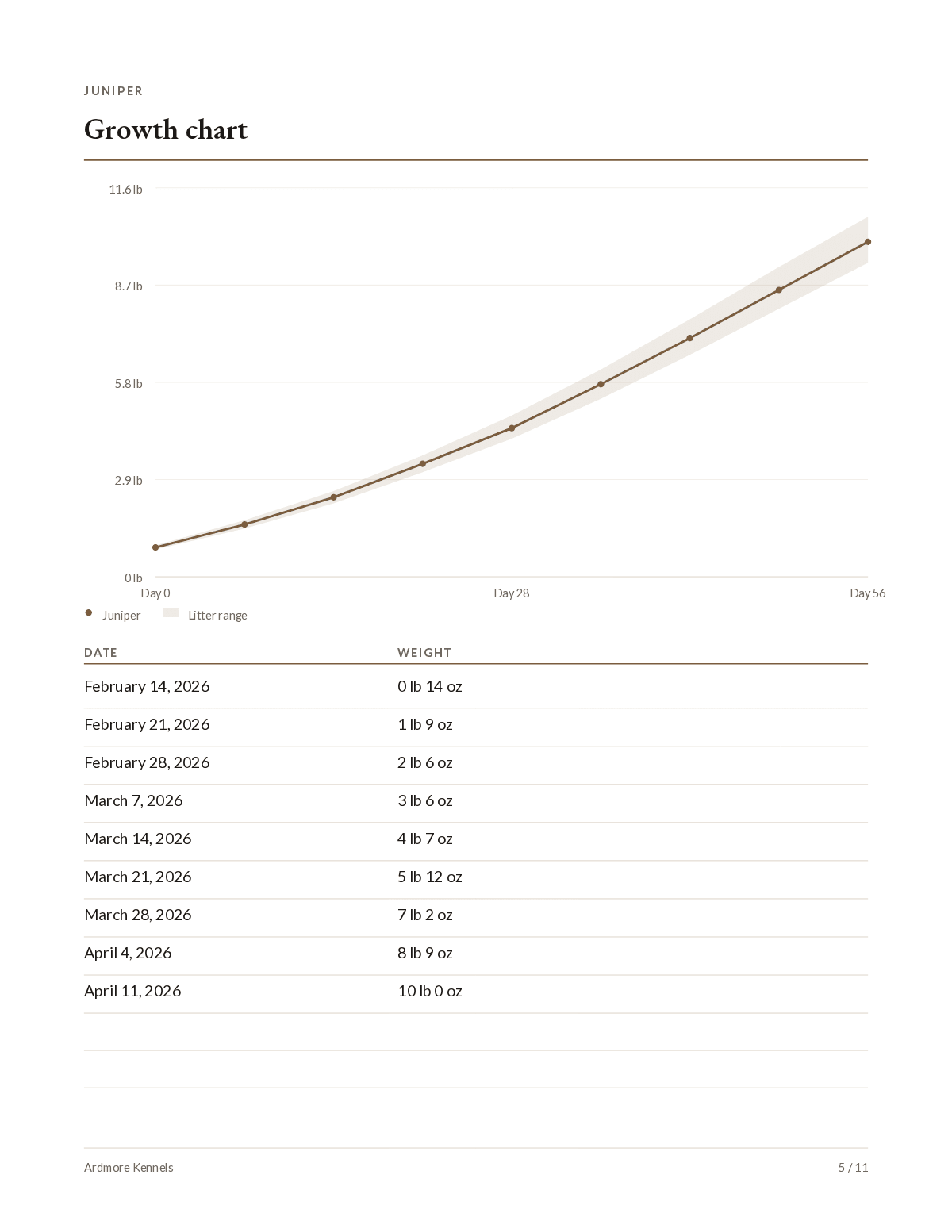
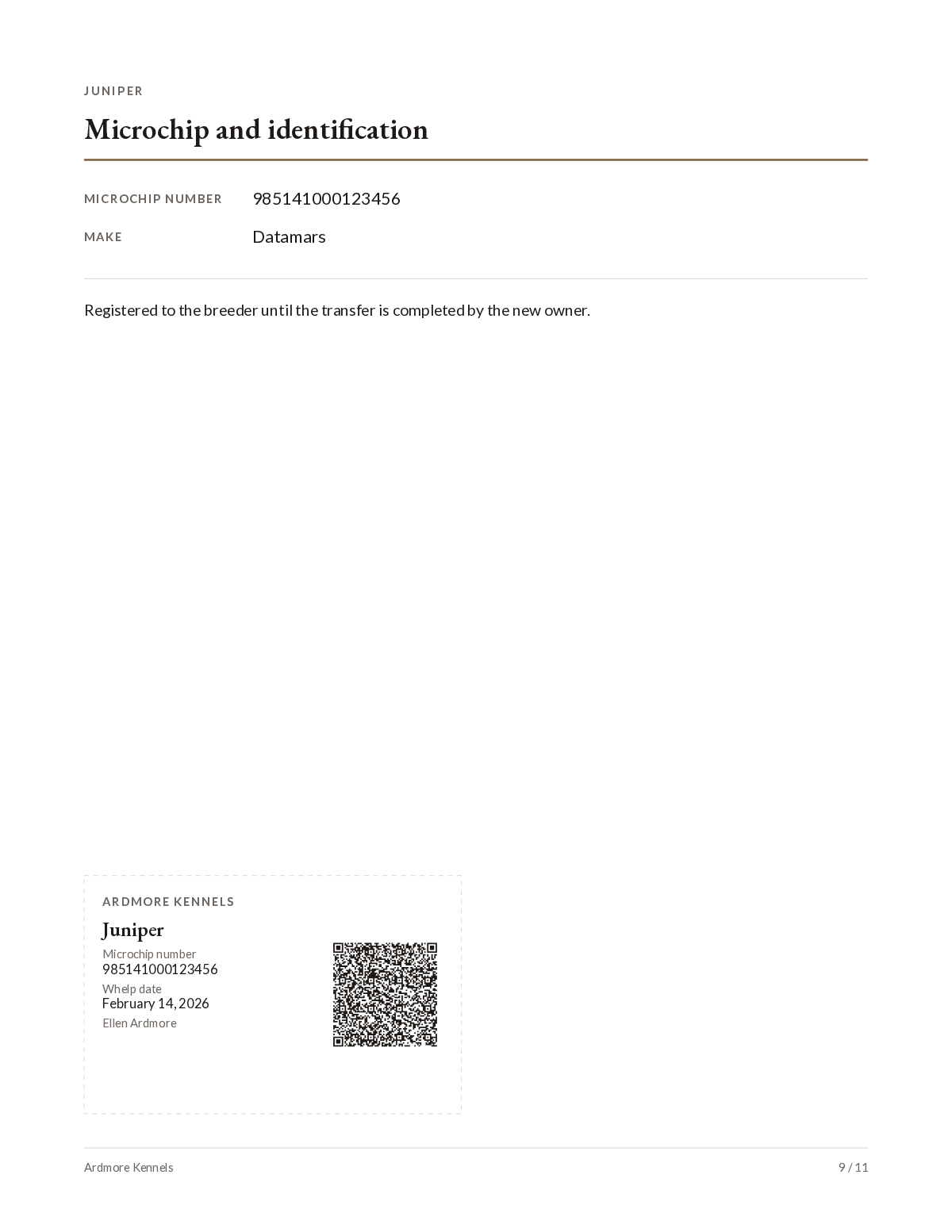
Here are five of the 10 sections — the cover, the puppy weight chart, the microchip page, the vaccination record and the pedigree. They print at US Letter or A4, in your kennel’s accent colour, with your logo and contact block on them — and the same pages go into your own litter record, so you keep an archive copy of everything you sent out.
The cover
Your kennel name and logo, the puppy’s photo, its name, and the date it was whelped.
The growth chart
Every weight you logged, plotted for this puppy against the rest of the litter.
The microchip page and wallet card
The chip number and make — and a cut-out wallet card with a QR code that saves your number to the new owner’s phone.
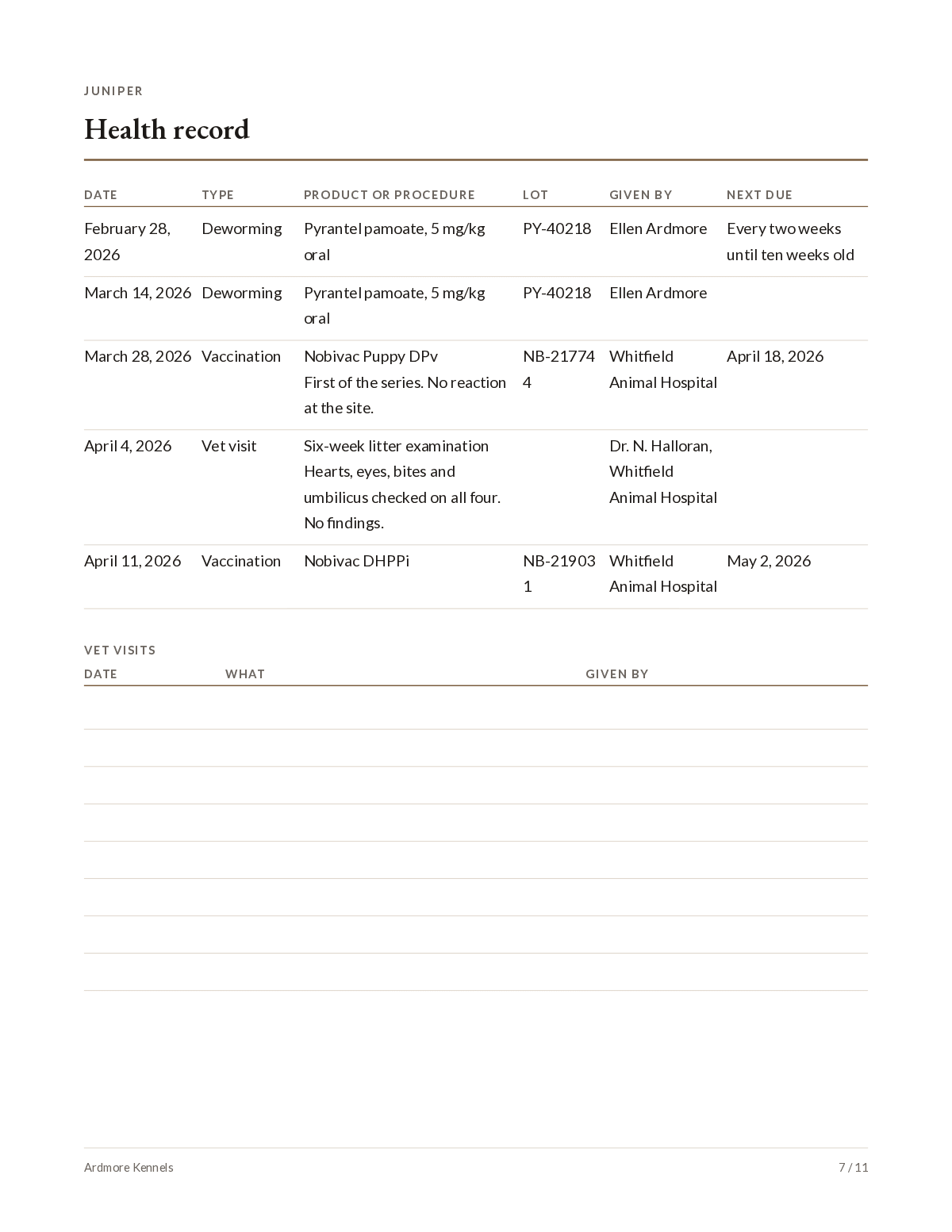
The health record
Vaccinations, dewormings and vet visits as you recorded them — with blank rows for the vet to carry on in.
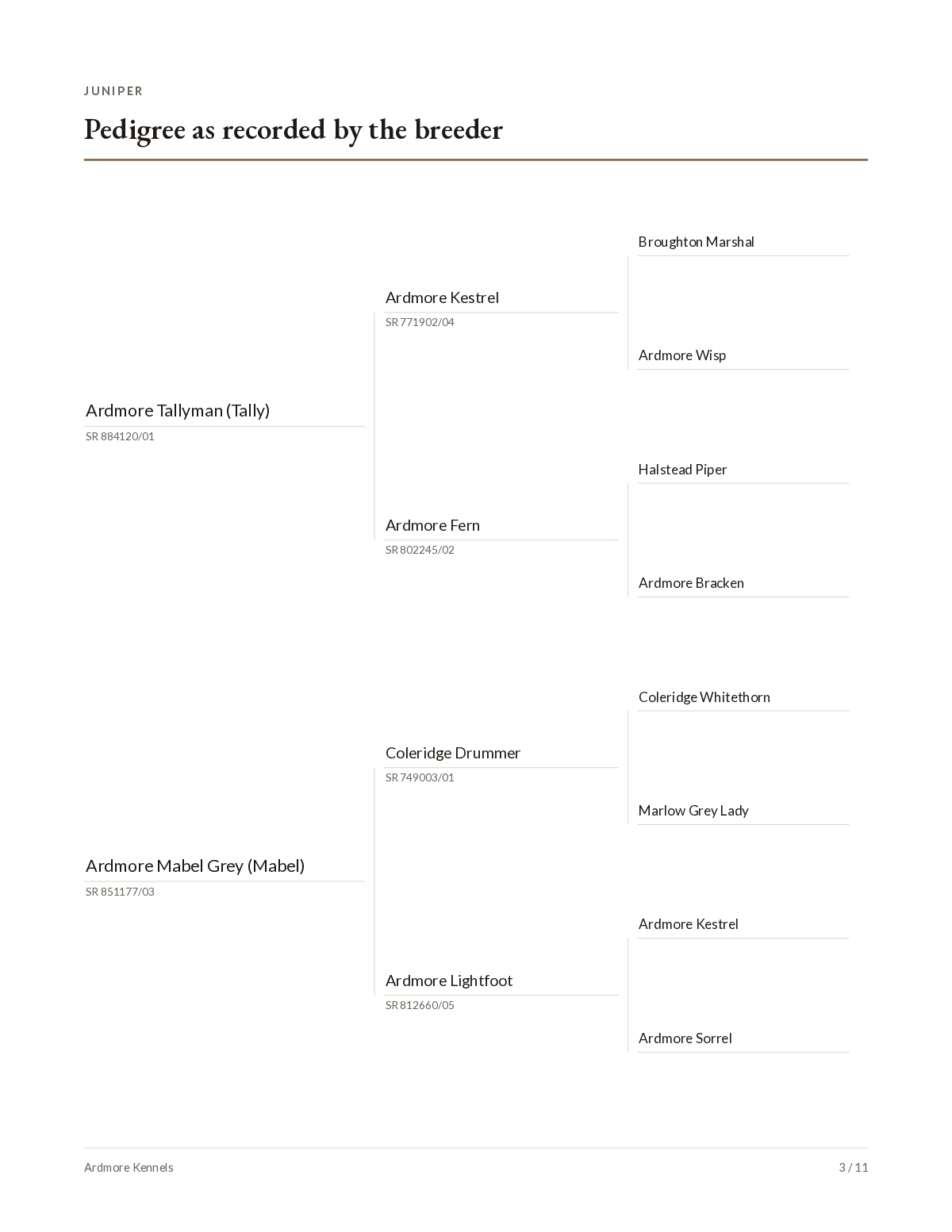
The pedigree
Three or four generations, typed once and printed in every puppy’s packet.
The full set: Go-home packet · Puppy profile · Pedigree as recorded by the breeder · Health testing of the sire and dam · Growth chart · Health record · Socialization and early experiences · Microchip and identification · Feeding · From the breeder. Any optional section switches off when you have nothing to put in it — a blank heading looks worse than no page at all.
Free, and no account. Build and preview every page of every puppy’s packet before you decide it is worth paying for — or open three finished packets as PDFs and print one first.
Three steps
From the whelping box to eight finished packets, in three steps
A litter of eight used to mean filling the same form eight times. Here the litter is one pass of typing and the generator does the eight, so the only per-puppy work is the handful of things that genuinely differ: the photo, the collar, the chip number, the weights and the family it is going to.
Enter the litter once
The sire, the dam, the pedigree, your kennel block, your vet, your feeding plan. Typed once for the whole litter — or brought in from the spreadsheet and the photographed paperwork you already have, and checked by you before anything is kept.
Add what differs per puppy
A photo, a collar colour, a chip number, a new family. Weigh the whole litter in one grid — dates down the side, puppies across the top — and the growth chart draws itself from what you logged.
Export the whole litter
A finished PDF for every puppy and one zip of the lot, plus your own litter record. Print them, take them to the copy shop, or email them. Come back next week, change a weight, and export again.
No retyping
Point a camera at the paperwork instead of retyping it
The litter is already written down somewhere — a vaccination card on the fridge, the registration certificate in a folder, a spreadsheet of weigh-ins going back to day one. Photograph them, or open the file, and the packet is built out of what is already there.
- Vaccination or worming record
- Vet invoice or health certificate
- Registration certificate or pedigree page
- Handwritten litter log
- A spreadsheet or CSV of puppies, or a grid of weights
Nothing is written until you say so. Everything read lands in a review table beside what it came from, field by field, and you keep or change each line — there is no threshold that skips it and no “import everything” button. Nothing you have already typed is overwritten.
What it fills in for you
- The dam and the sire — including registered names, registration numbers and the four grandparents — saved as dogs you will use again
- Every puppy: name, collar, sex, colour, markings, go-home date and the new family
- Microchip numbers and brands, read digit by digit and shown back for checking
- Weights, however many weeks of them, straight into the weighing grid
- The health record — product, date, lot, who gave it — and the socialization log
- Your kennel block, your vet, your feeding table and your letter to the new family
A spreadsheet is read on your own computer — only its column headings and three sample rows are sent, so that the column called “Chip #” can be matched to the microchip field. A photograph is the one exception on this whole site: the page you picked is sent to be read, one page at a time and only when you press the button. Both are written up in full on the privacy page. Read the detail.
Why it is worth the evening
What a breeder gets out of it
A packet that looks like a professional made it
Every puppy goes home with the same typeset, laid-out document: a cover with your kennel name and the puppy’s photo, then the pedigree, the growth chart, the health record, the microchip page and your feeding plan. It is the difference between handing over a folder and handing over a stack of printouts.
Built from the photos and records you already have
Photograph the vaccination card, the vet invoice or the registration certificate instead of retyping them, and open the spreadsheet the litter has been living in. The sire and dam, the puppies, the chip numbers, the weights, the health record, your feeding table and your kennel block are matched to the packet’s own fields and laid out beside what they came from. You confirm it line by line: nothing is written until you say it is right, and nothing you have already typed is overwritten.
Type the litter once, not once per puppy
The sire, the dam, the pedigree, the vet, the feeding plan and the health events are entered for the litter. Only what genuinely differs — the photo, the collar colour, the chip number, the weights — is entered per puppy. A litter of eight is one pass of typing, not eight.
Pages a template cannot give you
The weights become a real growth chart, drawn for each puppy against the rest of the litter. The microchip page carries a wallet card with a QR code that saves your number to the new owner’s phone. And the socialization record prints the work you actually did, which almost nobody sends home.
Why breeders hand over a packet at all
Because it is the clearest evidence a new family gets that you did this properly. They will read the growth chart, keep the vaccination record for the first vet visit, and find your phone number on it two years later when they have a question. Breeders in the UK, Ireland and Australia call the same thing a puppy pack and put the same documents in it. A handwritten note on the back of a vaccination card does the same job and says something different about the kennel it came from.
The alternative most breeders are using is a Word file or a fillable puppy packet template, filled in once per puppy — eight times for a litter of eight, retyping the same sire, dam, vet and feeding plan into every copy, and charting nothing. That is the job this replaces.
Hobby and show breeders with one to four litters a year, who already do this properly and want the paperwork to show it. It is not breeder management software. There is no buyer CRM, no waitlist, no deposits and no accounting — if you need those, a suite will serve you better than this will.
| The job | A Word file or fillable template | Breeder management software | PuppyGoHomePacket |
|---|---|---|---|
| Typing for a litter of eight | Eight times — the same sire, dam, vet and feeding plan into every copy | Once, after the whole kennel is moved into their system | Once. Only the photo, collar, chip and weights are per puppy |
| The growth chart | A blank grid to write in, or nothing | Usually charted in-app; what prints is up to them | Plotted per puppy against the litter, in the units you logged |
| An account | No | Yes | No. Nothing to sign up for, nothing to cancel |
| Where the litter lives | Your computer | Their servers | Your computer |
| What it costs | A few dollars, then an evening of your time per litter | A monthly bill, through the months with no puppies too | $29 for a litter, or $99 a year for a kennel |
Nothing to install, nothing to cancel.
The whole list
What the packet maker actually does
Everything below is in the product today. Nothing on this list is a plan — the plans are further down, under their own heading.
What comes out
- A finished PDF for every puppy, up to 16 in a litter
- One ZIP with the whole litter in it, so it is one download and one email
- Your own litter record — every weight, every health event, every chip number, and which family each puppy went to
- A wallet card on the microchip page, on a cut line, with a QR code that saves your phone number to the new owner’s phone
The 10 sections of the packet
- Go-home packet — The kennel name and logo, and this puppy’s photo and name.
- Puppy profile — Name, sex, colour and markings, whelp date, sire and dam.
- Pedigree as recorded by the breeder — Three or four generations, typed by you. Registration numbers are optional.
- Health testing of the sire and dam — Results as they were recorded: the test, the result, the date, and who issued it. Typed by you, printed as typed.
- Growth chart — This puppy’s weights plotted against the rest of the litter, in the units you logged.
- Health record — Vaccinations, dewormings and vet visits as you recorded them — product, lot, date, who gave it.
- Socialization and early experiences — What this puppy has met and done, with dates: surfaces, sounds, people, car rides, crate, bath, nails.
- Microchip and identification — The chip number and make, and your own note on registration or transfer.
- Feeding — The plan in your words: food, amount, meals a day, and how to change it.
- From the breeder — Anything you want the new family to read — grooming, training, when to call you. Your words, printed as written.
Entering the litter
- A weighing grid with the dates down the side and the puppies across the top, because that is how a litter is actually weighed
- Weights in pounds and ounces or kilograms and grams, whichever you logged them in
- Sires and dams are saved as dogs, not retyped — the second litter starts from the first
- Health and socialization events apply to the whole litter by default, with exceptions for the puppy who was done a day late
- A photo per puppy, cropped in the browser
- A spreadsheet you already keep — .xlsx or .csv — read on your own computer, with its columns matched to the packet’s fields for you to confirm
- A photographed vaccination card, invoice or registration page read into the same review table, one page at a time and only when you ask
- Anything the packet prints can come in that way: the puppies, the weights, the health and socialization records, the feeding table, your kennel block — and the sire and dam, saved as dogs you will use again
Making it yours
- Your kennel logo, kennel name and contact block, printed exactly as you type them
- An accent colour from a curated set, or your own hex
- One of three typeface pairings, each set to print as a finished document
- US Letter or A4, and US or UK/Australian date order
- Pedigree at three or four generations
- Optional sections switched off when you have nothing to put in them
- Blank continuation rows on the weight and vet-visit pages, so the packet stays in use after go-home day
What it deliberately does not do
- No contracts, bills of sale, health guarantees or deposit terms — not as templates, not as an option
- No vaccination schedules, next-due dates or feeding amounts invented by the software; it prints what you entered
- No registry logos and no "certified" pedigree — the page says "as recorded by the breeder", because that is what it is
- No buyer CRM, no waitlist, no public puppy listings
What it costs
Free to build and preview, then $29 a litter
Everything is free until you export. Enter the litter, bring in your spreadsheet, log the weights, and look at the finished packet for every puppy with your own dogs' details in it — that preview is the whole product, not a sample of it. A pass does two things: it takes the SAMPLE watermark off the exports, and it reads the rest of that litter's photographed paperwork, of which the first three pages are read for nothing. $29 covers one litter and every puppy in it, or $99 a year covers every litter you have.
Free
$0
The whole editor, and a full preview of every packet with your own litter in it. Exports are stamped SAMPLE across each page.
Litter pass
$29once
One litter, every puppy in it, packets without the sample watermark, and the rest of that litter’s paperwork read from your photographs. Pay once, no account and nothing to cancel.
- Clean packets for up to 16 puppies in one litter
- A PDF per puppy, and a zip of the whole litter
- The rest of the litter’s paperwork read from your photographs, not just the first three
- Keep editing and re-exporting that litter afterwards
- Does not expire
Kennel year
$99/year
Every litter for a year on one licence key, still with no account to make. For kennels with several litters on the ground.
The limit, before you pay:It covers one litter — the pass is tied to the dam's name and the whelp date, both of which print on every packet. A second litter needs a second pass. Past three litters a year the kennel plan costs less. Reading photographed paperwork is metered too — the first three pages are read for nothing, and a pass reads the rest of that litter’s. Full pricing.
Your litter is saved in this browser, on this computer — it is not uploaded and we never see it. That also means it is yours to look after: export a backup file and keep it with your other kennel records. What happens to data, in full.
Not built yet — what is being worked on next
None of the following exists today. It is here so you can tell whether this tool is heading somewhere useful to you before you spend an evening typing a litter into it. Everything under “What the packet maker actually does” is in the product now.
Start the next litter from the last oneNot built yet
Carry the kennel block, the vet, the feeding plan and the socialization list forward with one button, so litter two begins mostly filled in.
Paste weights and chip numbers straight from the clipboardNot built yet
Opening a spreadsheet file already works. This is the quicker version of it: copy a block out of Excel, Sheets or a notes app, paste it into the weights grid or the puppy list, and see what was read before anything is committed.
Scan a microchip barcode with the cameraNot built yet
A chip number is fifteen digits that must be exactly right, and it is printed as a barcode on the chip’s own label. The camera reads it on your own device, and nothing is sent anywhere.
Straight answers
One page each, answering the question in the first sentence. They exist because breeders type these, not because a keyword tool suggested them.
- What should you put in a puppy go home packet?
- Is a puppy packet template worth buying, or is there something better?
- How do breeders chart puppy weights for a whole litter?
- What should a breeder’s puppy vaccination record show?
- How do you put a dog pedigree chart in a puppy packet?
- Should a breeder send a socialization record home with the puppy?
Try the packet generator on your next litter
On go-home day the family drives away with the puppy and whatever you put in their hands. Make it a folder they keep: the pedigree, the growth chart, the shot record, the chip number, and your name and number on every page. Nothing to sign up for, nothing to install, and no card until you decide the packet is worth printing.
One pass covers one litter, up to 16 puppies.
Questions breeders ask first
- What is a puppy go home packet?
- A puppy go home packet is the paperwork a breeder sends with each puppy to its new family: who the puppy is, its pedigree, what it weighed as it grew, the vaccinations and dewormings it has had, its microchip number, and what to feed it. Breeders in the UK and Australia usually call the same thing a puppy pack. It is separate from the physical go-home bag of toys, food and a blanket — this tool makes the documents, not the bag.
- Can I see the finished packet with my own litter in it before I pay?
- Yes, and that is the point of the free tier. The whole editor is free, and you can preview every page of every puppy’s packet with your own dogs, photos, weights and pedigree in it. A pass does two things and neither is a feature you have not already seen: it takes the diagonal SAMPLE watermark off the exported files, and it reads the rest of that litter’s photographed paperwork, of which the first three pages are read for nothing.
- What does it deliberately not do?
- It writes no contracts, bills of sale, health guarantees or deposit terms, and it invents no vaccination schedules, next-due dates or feeding amounts — it prints what you entered and nothing else. The pedigree page is labelled as recorded by the breeder and carries no registry name or logo. It is also not breeder management software: no buyer CRM, no waitlist, no accounting.